

Exploring Windows 10 Build 19045.5435: New Features and Improvements
Microsoft has embarked on testing Windows 10 Build 19045.5435 (KB5050081) through the Release Preview Channel of the Windows Insider Program. This exciting update introduces a revamped Outlook app alongside essential fixes for several core functionalities, including virtual memory, input methods, NFC, and USB printing. These enhancements promise to enrich your Windows 10 experience significantly.
What’s New in Windows 10 Build 19045.5435?
The latest update in the Windows Insider Program replaces the longstanding Mail app with a fresh Outlook experience, now parallel to what’s available on Windows 11. This transition highlights Microsoft’s commitment to creating a unified user experience across its platforms.
Weather Integration in Calendar
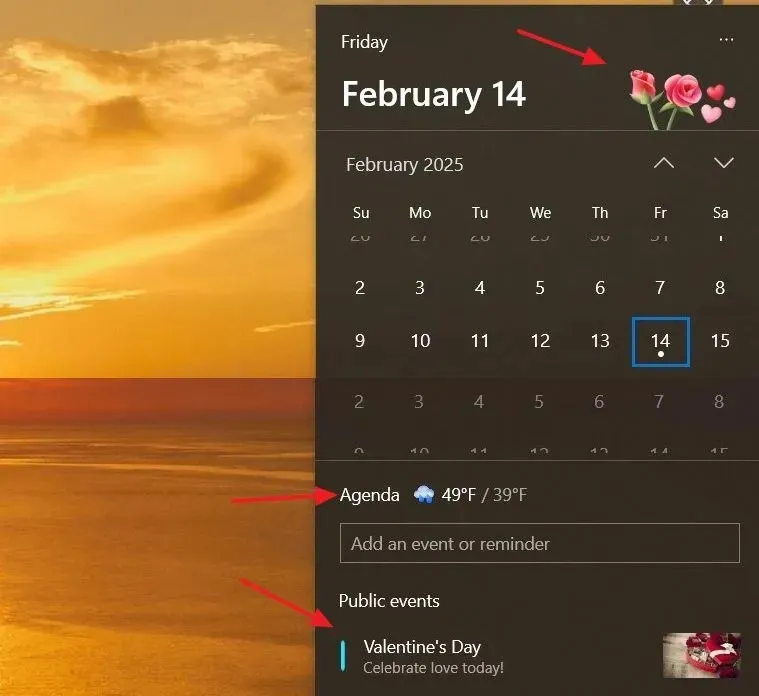
One of the standout features of this build is the integration of weather information within the Calendar app. To activate this feature, navigate to Settings > Time & Language, then toggle on the “Weather” option found under the “Calendar Events” section. You’ll also see options for “Feature holiday & events” and “Holiday illustrations.”

Once enabled, weather forecasts, holiday details, and thematic graphics will enrich your Calendar interface, easily accessible within the “time and date” area in the system tray.
Enabling Calendar Configuration via ViveTool
If you’re having trouble locating these new settings, you can enable the “Calendar events” section through the ViveTool utility. Execute the following command in your command prompt:
vivetool /enable /id:51858330,48433719,49453572
Key Fixes in This Update
This update isn’t just about new features; it also addresses critical performance issues:
- Virtual Memory Issues: Users may experience apps crashing due to virtual memory problems. This update aims to resolve those conflicts.
- IME Enhancements: Issues with the Chinese Pinyin input method editor (IME) will be addressed to restore automatic suggestion capabilities from Bing.
- NFC Functionality: Problems hindering NFC card reading are fixed, ensuring smoother connections.
- USB Print Fixes: Resolves print spooler issues related to USB Print and IPP Over USB, improving connectivity.
- Capture Service Improvements: The update remedies glitches affecting the Snipping Tool and Capture Service, enhancing usability.
Additionally, Microsoft has updated its list of drivers that are potentially vulnerable to BYOVD (Bring Your Own Vulnerable Driver) attacks, bolstering system security.
How to Install the Cumulative Update
Interested in downloading and integrating Windows 10 Build 19045.5435? Follow these instructions:
- Open Settings and head over to Update & Security.
- Select Windows Update, and ensure the toggle for “Get the latest updates as soon as they’re available” is activated.
- Click on “Check for updates” to initiate the update process.
Your device will fetch the latest updates and guide you through the installation process. Enjoy the enhancements and fixes that come with the new build!
Additional Insights
1. What are the primary features introduced in Windows 10 Build 19045.5435?
This build mainly introduces the new Outlook app, weather integration in the Calendar, and several fixes, including virtual memory improvements, USB printing optimizations, and enhancements to IME functionalities.
2. How can I enable the weather feature in my Calendar?
To enable the weather feature, navigate to Settings > Time & Language and toggle the “Weather”option under the “Calendar Events”section.
3. What should I do if I encounter issues after installing the update?
If you experience problems post-installation, consider reverting recent changes or utilizing the troubleshooting options in the Update & Security section of the settings. You may also check online forums or Microsoft’s support for further assistance.
Related Articles:

How to Update Secure Boot Certificates on Windows 11 as Microsoft Replaces Expiring Ones – Complete Guide
17:42
Windows 11 26H1 KB5073097 (Build 28020.1371) Fixes Start Menu and File Explorer Issues (Canary)
12:43
Complete Guide to Uninstalling Apps with Revo Uninstaller on Windows 11
16:43
Leave a Reply