

Upgrading Windows 10 Home to Windows 10 Pro: A Comprehensive Guide
Transitioning from Windows 10 Home to Pro can enhance your computing experience, especially when you’re in need of advanced features suitable for business or power users. In this guide, we will explore two effective methods to perform this upgrade seamlessly without the need for a clean installation.
Methods to Upgrade from Windows 10 Home to Pro
- Method 1: Upgrade through Settings
- Method 2: Purchase and upgrade via the Microsoft Store
1. Upgrade Windows 10 Home to Pro via Settings
If you possess a valid Windows 10 Pro product key, you can upgrade through the Activation settings. Here’s how:
-
Open the Settings app on your Windows 10 device.
-
Select Update & Security.
-
Navigate to the Activation tab.
-
Click the “Change product key” option under the “Upgrade your edition of Windows” section.

-
Input your Windows 10 Pro product key.
-
Click the Next button.
-
Finally, click the Start button to begin the upgrade process.
Upon completion of these steps, your device will be upgraded from Windows 10 Home to Pro, activating the enhanced features immediately.
Stay updated with the latest guides and tips by subscribing to my newsletter.
Subscribe
2. Upgrade Windows 10 Home to Pro via Microsoft Store
-
Launch the Settings application.
-
Select Update & Security.
-
Click on the Activation tab.
-
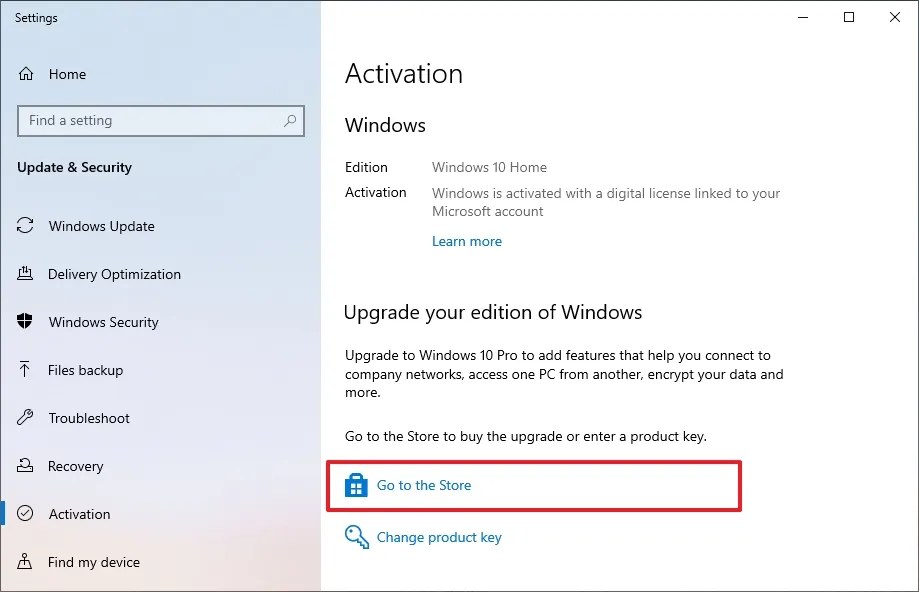
Hit the “Go to the Store” button in the “Upgrade your edition of Windows” section.
-
Click the “Get for $99.00” button to purchase the Pro edition.

-
Follow the on-screen instructions to complete the purchase and upgrade.
Once these steps are finished, your system will be updated to the Pro edition, unlocking a suite of advanced features.
While it’s still possible to upgrade individually, it’s worth considering updating to Windows 11 to ensure ongoing support for your device as Windows 10 reaches its end of life.
If you wish to retain Windows 10 functionality beyond October 14, 2025, enrollment in the Extended Security Updates (ESU) program is necessary.
Update January 2, 2026: This article has been revised to reflect the most current upgrade pathways.
Related Articles:

How to Update Secure Boot Certificates on Windows 11 as Microsoft Replaces Expiring Ones – Complete Guide
17:42
Windows 11 26H1 KB5073097 (Build 28020.1371) Fixes Start Menu and File Explorer Issues (Canary)
12:43
Complete Guide to Uninstalling Apps with Revo Uninstaller on Windows 11
16:43
Leave a Reply