

Ranking up in Marvel Rivals can be an arduous journey. While individual skill plays a crucial role, the performance of your teammates is equally significant. Success in this game is not just about personal prowess; it’s a team effort. Fortunately, there is an underappreciated setting that can enhance your gameplay awareness and performance.
Many players struggle with poor matchmaking and unpredictable teammate behaviors, making the climb to higher ranks feel insurmountable. Seasonal resets often exacerbate the situation, leading to chaotic matches where unranked players are pitted against former high achievers.
Improving your mastery of heroes and maintaining consistent gameplay are essential strategies. However, when your team falters, your rank can suffer significantly.
Uncover a Game-Changing Feature for Marvel Rivals
Marvel Rivals players have found a hidden setting that notifies them when a teammate is knocked out, providing critical situational awareness during gameplay.
This option allows you to hear notifications every time a teammate is defeated. Such feedback can indicate whether you’re being supported by healers or are about to face overwhelming odds. However, be prepared for the emotional toll of hearing your teammates fall repeatedly, especially in challenging matches.
Enable this setting to immediately improve your gameplay in Marvel Rivals Ranked. by u/Myth-Samael in marvelrivals
Player testimonials about this feature highlight its effectiveness. For instance, one user referred to it as an “instant game improvement”, while another expressed that hearing teammates drop “like flies” can be disheartening. A tank player mentioned how the notification lets them know when to retreat before being overwhelmed.
Steps to Enable Notifications for KO’d Teammates in Marvel Rivals
- Access the Settings menu.
- Navigate to the Audio tab.
- Select Combat Mix.
- Scroll to the KO Sound Cue option.
- Enable Announce when teammate is KO’d.

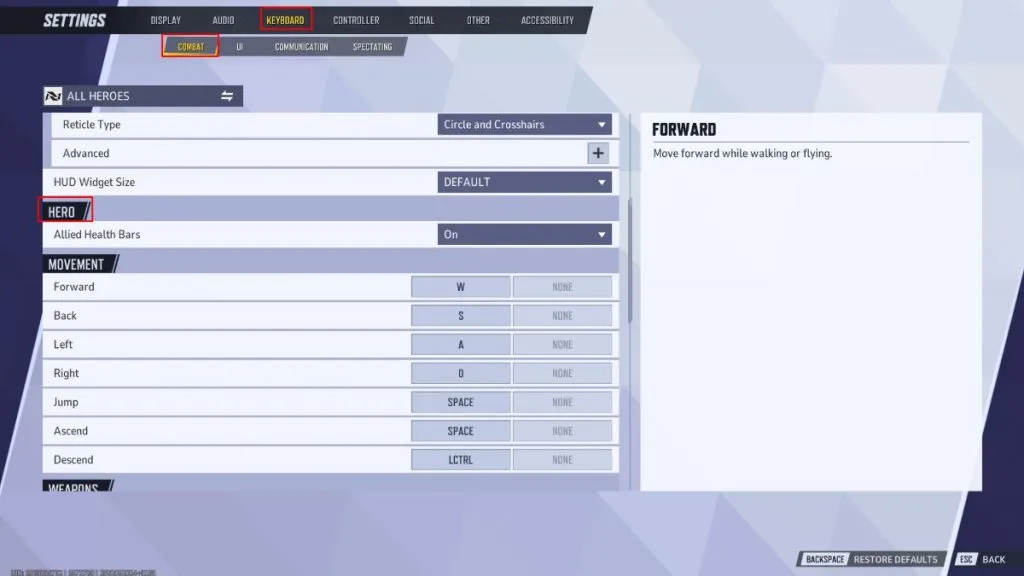
Additionally, consider enabling the Allied Health Bars feature, which is typically turned off by default unless you’re playing a healer. Many players have expressed surprise that visibility of allied health is not a universal setting. One healer noted, “Here I am, assuming everyone sees the tanks retreating with only 5% health when really I was the only one who noticed.”
How to Activate Allied Health Bars in Marvel Rivals
- Open the Keyboard Settings.
- Choose Combat.
- Locate Hero options.
- Enable Allied Health Bars.
One player humorously suggested that “disabling chat improves both gameplay and sanity, ” highlighting a relatable sentiment among players. This is merely the beginning of the vast array of customizable settings available in Marvel Rivals. Players can even adjust crosshairs for each hero, ensuring that they have the optimal setup for their playstyle. For those seeking the best configurations, a comprehensive list is available.
Related Articles:

Microsoft CEO Acknowledges ‘Work to Do’ to Regain Xbox and Windows Fans After Recent Changes
18:12
Roblox Introduces Stunning Photorealistic Graphics in Major Visual Overhaul
15:13
45-Year-Old Man Sneaks into Best Buy Overnight for Early Pokémon Card Release
14:41
Leave a Reply